


Perry Weather
3.123.00 Reviews
App Specs
- Version
- 4.8.0
- Updated On
- License
- Free
- Downloads
- 10,000+
- Developer
- Perry Weather, Inc.
- Categories
- Weather
- Platform
- Android
Screenshots
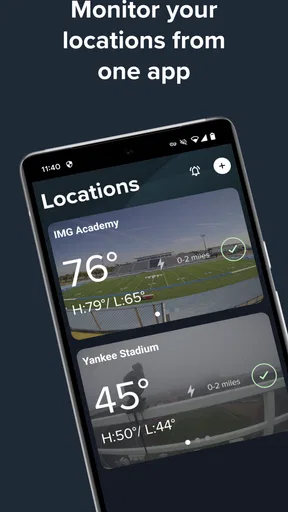
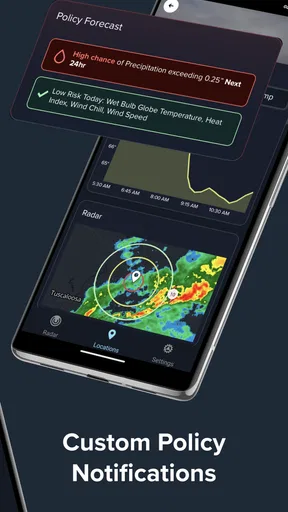
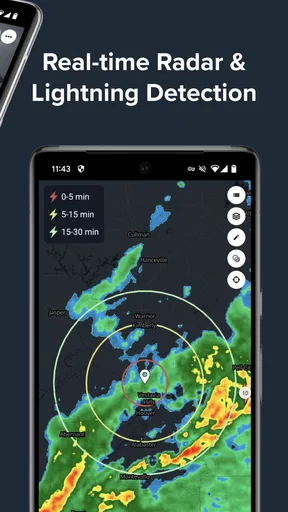
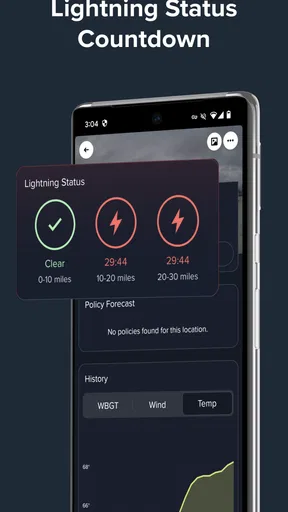
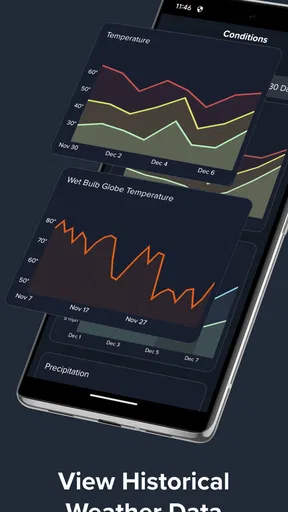
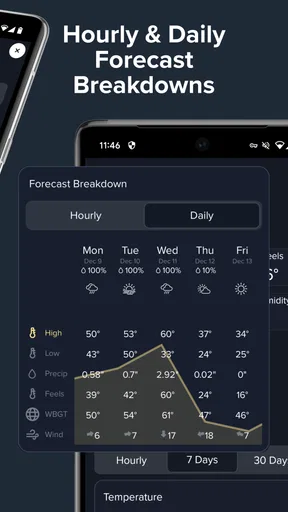
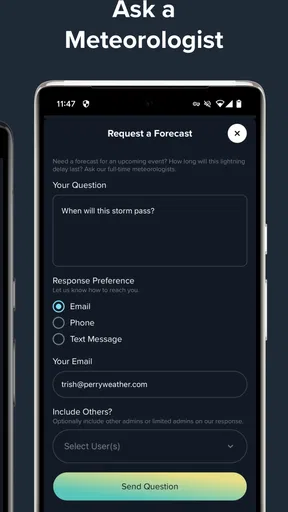
 Analysis by AppCompare
Weather apps usually compete by showing more layers, more forecasts, and more polished maps. Perry Weather takes a narrower and more practical route. I found it most interesting when I stopped treating it as a general forecast companion and started using it as a quick check for immediate outdoor conditions, especially lightning risk and precipitation. That focus gives the app a clear purpose, but it also means it will not replace every weather tool on your phone.
Developed by Perry Weather, Inc., this free weather app is aimed at people who need timely information before or during outdoor activity. Its central appeal is not a long-range forecast full of decorative details. Instead, it brings together real-time lightning strike information, precipitation awareness, weather data, and alerts in one place. In my experience, that makes it easier to answer a simple but important question: is it sensible to stay outside right now?
The app is available to Everyone and has a 3.1 average from around 43 ratings, with roughly 23 written reviews. Those numbers suggest a mixed reception rather than universal approval. It has passed the 10K-install mark, so it is not an unknown experiment, but it also feels more specialized than the major forecast apps most people install first. I would recommend approaching it as a focused safety and activity tool, not as the only source of weather information in every situation.
How Perry Weather fits into everyday weather checking
The current version is 4.8.0, and the app supports Android 7.0 or newer. That makes it usable on many older phones, which is helpful if you keep a spare device at a sports facility, campsite, workplace, or family vehicle. The interface is most valuable when you open it with a decision already in mind: whether to begin a game, continue a walk, move a gathering indoors, or wait before leaving.
A realistic example is a weekend youth soccer match. The sky may look acceptable when players arrive, yet nearby lightning or an approaching rain band can change the situation quickly. I would use Perry Weather before warmups, then check it again during a pause. The useful habit is not staring at the screen continuously; it is creating a simple routine around the app’s alerts and current conditions, while still following the safety rules of the venue or organizer.
That distinction matters. A weather app can provide information, but it cannot decide whether an outdoor event is safe in every local context. Trees, buildings, hills, and changing storm cells can affect what people experience on the ground. I see Perry Weather as an extra layer of awareness rather than permission to ignore official warnings, local staff, or common sense.
Compared with a typical all-purpose weather app, Perry Weather feels less concerned with being a complete daily dashboard. Standard alternatives are often better for hourly temperatures, extended planning, sunrise and sunset details, travel forecasts, and broad location coverage. Perry Weather becomes more appealing when the immediate concern is lightning or precipitation and the user wants a focused way to monitor outdoor conditions.
Worth Reading Before You Choose

Flipboard Shows What News Apps Must Do Beyond the Feed

Switching to Android Auto Means Rethinking Your Driving Routine

Google Calendar Makes a Crowded Week Easier to Manage

Ludo King Makes the Most of the Minutes Between Plans

Baby Panda World Brings Quick Play to Modern Phones, but Its Game Library Feels Busy

ESPN’s Live Game View Makes Following Close Games Easier
Why the lightning focus changes the way I use it
Lightning information is not just another decorative map layer. It changes the timing of a decision. A forecast that says thunderstorms are possible later in the afternoon is useful for planning, but it does not answer whether a field should remain occupied at this moment. Perry Weather’s emphasis encourages shorter check-ins and a more cautious response to rapidly changing conditions.
One practical workflow is to check the app before leaving home, check again when arriving at the outdoor location, and rely on alerts or responsible event staff while activity is underway. This avoids a common mistake: looking at a forecast once and assuming it will remain accurate for the entire afternoon. The app is better suited to this repeated, situational use than to a single morning glance.
Another useful trade-off is attention. A focused weather tool can reduce the temptation to scroll through unrelated forecast details, but it may leave you wanting more context. If I were planning a road trip, choosing clothing for several days, or comparing conditions across multiple destinations, I would pair it with a conventional forecast app. If I were deciding whether a nearby outdoor activity should pause, its narrower emphasis would be more relevant.
What the current release means for existing users
The presence of version 4.8.0 tells me that the app is not frozen at its original release. Perry Weather first appeared on August 28, 2015, so the product has had a long period to move beyond its initial form. I would treat that history as a sign of ongoing maintenance, while avoiding the assumption that every user will notice a dramatic redesign or a particular new function. The important point is that the current experience should be judged on how reliably it supports quick weather decisions today.
For someone returning after a long break, the best approach is to review the app’s current alert behavior and location setup rather than relying on memory. Weather apps can feel familiar while small changes in navigation or notification handling affect daily use. I would also test it in a low-stakes situation before depending on it for a tournament, work shift, or important outdoor gathering.
New users should begin with one location and one clear purpose. For example, monitor the park where a regular activity takes place, learn how precipitation and lightning information are presented, and observe how quickly the app helps you make a decision. This is more useful than adding many places immediately and turning the experience into a cluttered list of forecasts you rarely check.
The app’s free price lowers the barrier to trying that workflow. There is no purchase decision to make before discovering whether its focused approach suits you. Still, free does not automatically mean frictionless. The real test is whether the information appears clearly enough, at the right moment, and with enough context for your particular outdoor routine.
Small habits that make the app more useful
The first habit I recommend is checking conditions at the actual venue, not only at home. A short drive can put you in a different part of a storm system, and a general city forecast may not reflect what is happening at a field, trailhead, or open worksite. Perry Weather makes more sense when the selected location matches the place where the decision will be made.
The second is to treat alerts as prompts to reassess, not as a complete safety plan. If an alert arrives during an activity, pause and confirm what is happening locally. Move people to an appropriate safe area when necessary, and follow the instructions of the facility or event leader. The app can shorten your reaction time, but the quality of the response still depends on preparation.
The third is to use it before a commitment rather than after conditions have already become uncomfortable. Checking before setting up chairs, carrying equipment onto a field, or starting a long walk gives you more options. Once an activity is underway, people are more likely to minimize warning signs because they have already invested time and effort.
A fourth, less obvious advantage is that the app can support communication between people who share responsibility for an activity. A coach, grounds worker, event volunteer, or outdoor supervisor can use the same weather picture when deciding whether to delay or relocate something. That does not make the information automatically authoritative, but it can reduce the confusion caused by everyone checking different apps with different displays.
Where the experience still has limits
The mixed rating is understandable because a focused weather app has a high standard to meet. When people open it during a storm concern, they need clarity more than visual flair. Any delay, unclear alert, or confusing location setting can feel more serious than a minor inconvenience in a normal forecast app. I would not install Perry Weather and immediately assume it is ready to manage a critical outdoor operation without testing it first.
It is also not the best choice for users who want one app to handle every weather question. If your normal routine involves checking a detailed hourly forecast, comparing several cities, reading extended outlooks, or planning travel days in advance, a broader weather service will probably be more comfortable. Perry Weather’s value is strongest when lightning and precipitation monitoring are central to the decision.
Another limitation is human interpretation. A map or alert can indicate changing conditions, but users still need to understand what action makes sense. Someone unfamiliar with storm safety could mistake a quiet moment for an all-clear. I would especially avoid using any single app as the sole basis for decisions involving children, large groups, remote locations, or exposed areas.
There is also a difference between technical availability and practical reliability. The app supports older Android devices, which is convenient, but an older phone may have its own battery, connectivity, or notification limitations. Before relying on it outdoors, I would make sure the device is charged, the chosen location is correct, and alerts are not being silently restricted by the phone’s settings.
Who should use it and who should choose something else
Perry Weather is a good fit for people who regularly make short-notice outdoor decisions. Coaches, recreational organizers, grounds teams, parents attending field activities, outdoor workers, and anyone who spends time in open areas may appreciate the emphasis on lightning and precipitation. It is also worth trying if your current weather app gives you plenty of forecast detail but does not make immediate storm awareness easy to follow.
I would be more cautious about recommending it to someone who wants a polished general-purpose weather companion. A casual user may prefer an app that puts temperature, conditions, hourly changes, and a longer outlook in the foreground. Perry Weather can be added alongside that kind of app, but it may feel incomplete if used alone.
It is not the right tool for replacing official emergency communication, workplace safety procedures, or venue-specific lightning policies. Those systems may have responsibilities and local knowledge that a phone app cannot provide. The strongest setup is layered: use Perry Weather for timely awareness, use a broader forecast source for planning, and follow the person or organization responsible for the activity.
What I would watch as the product continues
For future use, I would pay attention to how the app balances speed with explanation. Real-time information is valuable only when the display helps a person understand what to do next. Clear location handling, dependable alerts, and an uncluttered presentation matter more here than adding a long list of secondary forecast features.
I would also watch whether the experience remains useful for both individuals and organized activities. A parent checking a child’s practice and a supervisor monitoring an outdoor work area may need different levels of context, even though both care about lightning and rain. The app’s focused identity is a strength, but it should not become so narrow that users cannot make sense of changing conditions around a real event.
The long history behind the product makes continued refinement worth noticing. Since its original release, the app has reached its current 4.8.0 version, and that evolution suggests that Perry Weather is intended to remain an active product rather than a one-time utility. I would judge future updates by practical improvements: easier checks, better confidence in alerts, and less effort when monitoring a familiar place.
My final view is positive but measured. Perry Weather is free, easy to try, and unusually focused on the moments when lightning and precipitation can interrupt outdoor plans. I would keep it as a companion to a broader weather app, especially for sports, events, and regular outdoor routines. Its real strength is helping turn a vague “maybe a storm is coming” feeling into a prompt to check conditions and act earlier.
If you want one app for every forecast need, choose a more comprehensive alternative. If your main question is whether to continue, delay, or rethink an outdoor activity, this app deserves a place on your shortlist. My recommendation is to test it before an important event, build a simple check-and-response routine, and remember that the best weather decision combines app information with local observation and responsible safety guidance.
Pros
- Real-time weather alerts can help users prepare for dangerous conditions.
- Location-based forecasts make it easier to monitor nearby weather risks.
- Useful for outdoor work
- sports
- and event planning.
- Clear warnings may support faster safety decisions during severe weather.
- Can help organizations coordinate weather-related precautions.
Cons
- Some features may require an account or access provided by an organization.
- Alerts depend on accurate location permissions and notification settings.
- Forecast details may vary by region and available weather data.
- Frequent warnings could feel overwhelming during active weather periods.
- The app may be less useful for users outside supported service areas.
FAQs for Perry Weather
What is Perry Weather, and what does the app do?
Perry Weather is a weather monitoring and safety platform designed primarily for organizations, venues, schools, construction sites, sports facilities, and outdoor events. It provides weather forecasts, real-time alerts, lightning detection, and configurable notifications. After reviewing its features, the app appears focused less on casual daily weather checking and more on helping teams make informed decisions when severe weather could affect people, schedules, or operations.
Does Perry Weather provide severe weather and lightning alerts?
Yes, severe weather and lightning monitoring are among Perry Weather’s main purposes. Depending on the organization’s setup and subscription, users may receive notifications about nearby lightning, storms, dangerous conditions, and other weather risks. Alerts can help staff decide when to pause activities, move people indoors, or resume operations. Availability and alert types may vary according to the account, location, and administrator settings.
Is Perry Weather free to download and use?
The Perry Weather app may be available to download without an upfront charge, but access to its full monitoring and notification features generally depends on an organization’s Perry Weather account or service subscription. It is not necessarily intended to function like a completely independent free consumer weather app. Before downloading, users should check whether their employer, school, venue, or event organizer has provided access credentials or instructions.
Who can use Perry Weather, and is it suitable for personal weather tracking?
Perry Weather is mainly designed for teams and organizations that need coordinated weather safety procedures rather than for individuals seeking a simple forecast. It can be useful for venue managers, event staff, athletic departments, construction supervisors, and other operational teams. Personal users may find the app less useful unless they belong to an organization using the platform and have been invited to view its alerts or dashboards.
What should I check before downloading Perry Weather?
Before installing Perry Weather, confirm that your organization supports the app and that you have the correct login details, invitation, or access code. You should also review notification permissions, location access requirements, battery impact, and whether your device is running a supported Android or iOS version. Since timely alerts are important, keep notifications enabled and avoid relying on the app alone during life-threatening emergencies.


